Native App Passkey Errors: Ultimate Overview (2026)
Native app passkey errors differ drastically between iOS and Android. Learn what breaks, why Android is 3-5x worse and how to measure it.


- Native apps give better error signals than web. With
preferImmediatelyAvailableCredentials, they can distinguish "no credential available" from "user cancelled", a signal browsers deliberately hide. - Android is 3-5x worse than iOS. Median abort rates are ~10-14% on Android native vs ~2-3% on iOS native, and budget Android devices can reach 75-90%.
- Code is immutable once deployed. You cannot hotfix a shipped app version, so error handling bugs persist for months until users update.
- Android's internal error codes are invisible to web browsers. GPS compresses 50+ failure modes into 12 generic WebAuthn types before Chrome sees them, while native apps can parse the raw messages.
- Do not apply iOS thresholds to Android. A 5% abort rate on iOS may signal a bug, the same 5% on Android flagships is excellent.
1. Introduction#
When deploying native apps at large scale with passkeys, difficult problems start appearing that cannot be anticipated. Why is it so difficult to deploy passkeys in native apps?

See how many people actually use passkeys.
The most important matter: code cannot be changed once deployed. One version will often stay available for a long period. The second matter: diagnosing problems is difficult - you can't easily inspect what's happening inside the user's device. The third matter: the environment is constantly changing and extremely heterogeneous - your app runs across dozens of OS versions, hundreds of device models, multiple authenticator configurations and varying network conditions, all shifting independently while your code stays frozen.
What this article covers vs related articles:
- For platform-specific error code references: see Apple Passkey Error Codes (iOS) and GPS Passkey Error Codes (Android)
- For web browser errors (DOMExceptions like
NotAllowedErrorandAbortError): see WebAuthn Errors in Production - This article: the operational layer - what breaks in native passkey deployments, how to measure it and when to act
In this article we answer the following questions:
- What can break - We take apart what can break in a native environment and what it encompasses
- How to measure - How should you measure native implementation of passkeys?
- Mitigation - What measures should you take to protect your native application?
2. Passkeys in native Apps#
Your implementation architecture determines which error surface you're dealing with. There are three primary approaches, each producing a different class of errors. For full implementation guidance, see Native App Passkeys: Native vs. WebView Implementation.
| Native Implementation | System WebView | Embedded WebView | |
|---|---|---|---|
| iOS API | ASAuthorizationController + ASAuthorizationPlatformPublicKeyCredentialProvider | ASWebAuthenticationSession / SFSafariViewController | WKWebView |
| Android API | CredentialManager + CreatePublicKeyCredentialRequest / GetCredentialRequest | Chrome Custom Tabs | android.webkit.WebView (AndroidX WebKit 1.12.1+) |
| Error surface | Platform-specific codes: iOS ASAuthorizationError domain codes (see Apple passkey error codes), Android [50xxx]-prefixed GPS error messages + Credential Manager exception types (see GPS passkey error codes) | Web DOMExceptions (NotAllowedError, AbortError, etc.) | Web DOMExceptions + native config failures (AASA, Digital Asset Links) |
| "No credential" signal | Clean - preferImmediatelyAvailableCredentials returns distinct "no credentials" | Hidden behind opaque NotAllowedError | Hidden behind opaque NotAllowedError |
| Config failure modes | AASA / assetlinks.json | None (runs in browser context) | AASA / assetlinks.json + WebKit version + feature detection |
| Error guide | This article | WebAuthn Errors guide | Both guides apply |
Many production apps combine approaches: attempt native login first with
preferImmediatelyAvailableCredentials for instant authentication, then fall back to
System WebView when no credential is available. This
combination is where the error classification in this article becomes most relevant - you
need to handle both native error codes and web DOMExceptions in the same flow.
The following discussion focuses on native implementation errors for Android and iOS. This analysis applies whenever you implement either operation:
- WebAuthn Get - Login with a credential
- WebAuthn Create - Create a new credential
3. Environment#
Understanding errors in native apps requires tracking the full environment context. Unlike web browsers where you control the update cycle and users run mostly recent versions, native apps face a dramatically more complex matrix. Your immutable code runs across a constantly shifting landscape of OS versions, hardware capabilities and authenticator states.
3.1 Environment Dimensions#
The environment for a native passkey implementation consists of eight independent dimensions that all vary simultaneously:
| Component | iOS Example | Android Example | Why it matters |
|---|---|---|---|
| OS Version | iOS 16 to iOS 26 | Android 13 to Android 16 | API availability changes (e.g. ASAuthorization behaviors differ between iOS versions, Credential Manager changes) |
| App Version | v2.1.0, v2.2.0, v2.3.1 all active | v3.0.1, v3.1.0, v3.2.4 all active | Bugs shipped in one version persist for 6-12 months until users update. Multiple versions run simultaneously in production |
| Device Brand | Apple | Samsung, Google, OnePlus, Xiaomi, Oppo | Manufacturer customizations affect WebAuthn behavior. Samsung has different biometric stack than Pixel. Some brands ship heavily modified Android |
| Device Model | iPhone 16, iPhone 17 Pro, iPhone 17 Pro Max (Face ID) | Pixel 9/10 Pro, Samsung S24 (SM-S921B), Galaxy A15 (SM-A156E), OPPO CPH2695 | Biometric hardware affects error patterns. Low-end devices have unreliable sensors. Specific models have known quirks |
| Authenticator Status | iCloud Keychain enabled/disabled, sync status, iCloud signed in | Google Password Manager enabled, Play Services version, third-party providers registered | Availability unpredictable. |
| Default / Preferred Authenticator | iOS 17+: iCloud Keychain or third-party (1Password, Dashlane) if selected in Settings | Android 14+: Google Password Manager or third-party (Bitwarden, 1Password) if registered and active | Third-party providers can be installed but deactivated. Operations fail differently when preferred provider unavailable vs when feature not supported pre-iOS 17/Android 14. Some manufacturers disable third-party support entirely |
| Device Protection | Passcode required, Face ID enrolled, Touch ID enrolled, passcode-only mode, biometric lockout | PIN/Pattern/Password required, fingerprint enrolled, face unlock enrolled, screen lock only, biometric lockout | Passkeys require device protection configured (passcode/PIN/gesture OR biometric). If neither configured, passkeys not supported. Lockout state affects which errors surface |
3.2 Android Diversity Problem - why Android breaks more than iOS#
The environmental complexity described above creates dramatically different outcomes on Android vs iOS. Android's extreme heterogeneity makes it 3-5x more susceptible to passkey implementation failures compared to iOS in production environments.
3.2.1 Error Rate Distribution by Platform#
When measuring abort rates across native passkey implementations, the distribution consistently reveals the Android diversity problem across virtually every deployment we have data or reports on:
| Platform | Best Case | Median |
|---|---|---|
| iOS Native | 0-3% (flagship models, recent iOS) | 2-3% |
| Android Native | 0-2% (Pixel, premium OPPO/Motorola) | 10-14% |
Key insight: The worst iOS device performs better than the median Android device. iOS maintains consistency across its ecosystem because Apple controls both hardware and software. Android's open ecosystem creates massive variance.
3.2.2 Brand-Level Performance Variance#
Android error rates cluster strongly by manufacturer, revealing how deeply customization affects reliability:
| Manufacturer Tier | Typical Abort Range | Reason |
|---|---|---|
| Google Pixel | 3-15% | Stock Android, tight Credential Manager integration, consistent hardware |
| Premium Android (Samsung S-series flagship) | 8-12% | Manufacturer customization balanced with quality control |
| Budget Android (Samsung A-series) | 20-40% | Cost-optimized hardware, unreliable biometric sensors |
| Low-tier Budget (ZTE, vivo budget) | 75-90% | Credential Manager implementation effectively broken on some models |
For comparison, iOS devices cluster tightly around 2-5% regardless of model, with outliers only appearing on very old hardware (iPhone 8/X era) running outdated iOS versions.
3.2.3 Authentication Method Gap#
Device protection type amplifies the Android fragmentation problem:
| Platform | Biometric Auth | PIN/Code Auth | Code Penalty |
|---|---|---|---|
| iOS | baseline | 1.5-2x worse | moderate degradation |
| Android | baseline | 2-3x worse | severe degradation |
Why this matters: On Android budget devices, PIN/code authentication can push abort rates from 30% to 60%+. The same operation on iOS might go from 3% to 6% - still usable.
3.2.4 Manufacturer Customization Impact#
The root cause is architectural:
iOS: Apple controls the entire ASAuthorization stack. iCloud Keychain integration is identical on iPhone 16 and iPhone 17 Pro. Updates are synchronized. Biometric hardware (Face ID, Touch ID) is standardized per generation.
Android: Manufacturers customize everything:
- Samsung's biometric stack differs from Google's
- Some manufacturers (OnePlus, Xiaomi, Oppo) ship heavily modified Android builds
- Google Play Services version variance affects Credential Manager availability
- Budget device manufacturers optimize for cost, not reliability
- Third-party provider support is optional - manufacturers can disable it entirely
This means an error on a Samsung Galaxy A15 running Android 15 tells you nothing about what will happen on a Pixel 9 running the same Android version. The codepaths are different.
3.2.5 Practical Implications for Error Classification#
When you see high abort rates:
On iOS:
- Likely a code bug (your implementation is broken)
- Or user behavior pattern (users actually canceling -
ASAuthorizationErrorCanceledcode 1001) - Or environmental issue (iCloud Keychain disabled/not signed in - surfaces as
ASAuthorizationErrorFailedcode 1004 wrapping an internal "Cannot create a passkey. iCloud Keychain is off." error, or the newASAuthorizationError.deviceNotConfiguredForPasskeyCreationcode 1010 on iOS 26+)
On Android:
- Could be code bug
- Could be user behavior
- Could be manufacturer customization breaking Credential Manager
- Could be budget device with broken biometric hardware
- Could be OS version too old for stable Credential Manager
- Could be device manufacturer disabled third-party provider support
- Could be Google Play Services version incompatibility
Bottom line: Don't use the same error rate thresholds for Android and iOS. A 5% abort rate on iOS might indicate a problem. The same 5% on Android flagship devices is excellent. On Android budget devices, anything under 30% is acceptable. For testing these device-specific behaviors systematically, see Testing Passkey Flows in Native iOS & Android Apps.

Authentication Analytics Whitepaper. Practical guidance, rollout patterns and KPIs for passkey programs.
4. What actually breaks in native Passkey Flows#
If you want to diagnose passkey issues in native apps, you need to separate where the failure happened from how it was classified later.
The following diagram shows the full lifecycle of a native passkey registration (create) operation. The flow applies to both Android (Credential Manager → TEE) and iOS (ASAuthorizationController → Secure Enclave). Each numbered step represents a boundary where failures can occur - from the app through the OS framework, down to secure hardware and back to the server:
In practice, native WebAuthn failures happen in five stages:
| Stage | What happens | Typical failure source | Best telemetry signal |
|---|---|---|---|
| Pre-authenticator | Build request, fetch challenge/options, fetch token | API/network/serialization/state issues | Unexpected error events with pre-authenticator context |
| Authenticator invocation | System sheet/dialog is shown and user/device responds | User cancel, no credential, platform/provider exception | Platform error codes: Apple passkey error codes (iOS), GPS passkey error codes (Android), WebAuthn errors (browsers) |
| Post-authenticator | Server-side verification / finish call | Backend rejection, timeout, transport failures | Server-side error codes from verification endpoint |
| User intent path | User declines the passkey path in app UI | Product UX choice, not technical failure | Abort tracking in your analytics |
| App crash | Authenticator response handling crashes the app | Unhandled exception during credential parsing, malformed response, threading issue | Crash reporting (e.g. Crashlytics, Sentry) correlated with passkey operation |
On both platforms, the authenticator invocation stage is where
native apps have a decisive diagnostic advantage over web browsers. Both Apple and Google
compress dozens of specific internal error codes into a small set of public error types
before they reach your app - and browsers lose even more detail on top of that. Native
apps that log the raw platform errors can distinguish root causes that browsers collapse
into generic NotAllowedError.
On Android, GPS generates 50+ internal error codes that are compressed into 12
WebAuthn types. Native apps can parse the [50xxx] prefixed error messages to identify
specific failures like Folsom sync key decryption (error 50162) that Chrome reports as
generic NOT_ALLOWED_ERROR. For the complete error code reference, architecture diagrams
and androidx.credentials error handling guide, see GPS
Passkey Error Codes: the complete Reference.
On iOS, Apple compresses ~22 internal error codes into 11 public
ASAuthorizationError codes. Native apps receive dedicated codes for common failures
(1001 for user cancel, 1006 for duplicate credentials, 1010 for device not configured)
that Safari collapses into generic DOMExceptions - and with
preferImmediatelyAvailableCredentials set, "no credentials" is recognizable as an
immediate 1001 return before any sheet is shown. For the complete error code reference,
translation mapping and Swift error handling guide, see
Apple Passkey Error Codes: the complete Reference.
| iOS | Android | |
|---|---|---|
| Internal error codes | ~22 (ASCAuthorizationError 0-22) | 50+ (GPS codes 50100-50196) |
| Public error codes | 11 (ASAuthorizationError 1000-1010) | 12 WebAuthn ErrorCode enum values |
| Key diagnostic mechanism | localizedDescription / NSUnderlyingErrorKey on code 1004 | [50xxx] prefix in error message string |
| Platform trend | Apple extracting specifics from generic 1004 each iOS release | Google migrating FIDO2 path → Credential Manager path |
| Browser information loss | Safari translates to ~3 DOMException types | Chrome pattern-matches on 5 known message strings |
| Full reference | Apple passkey error codes | GPS passkey error codes |
Beyond these stages, two behavioral patterns are critical to detect:
Authentication loop detection: When the authenticator invocation fails and error handling is incorrect, the app can enter a retry loop - repeatedly invoking the authenticator, crashing or failing each time. This is especially dangerous in native apps because the user has no way to break out except force-closing the app. At Corbado, we detect these loops server-side by tracking repeated failed attempts from the same session within a short time window. A loop pattern (3+ failed attempts within a few minutes) is a strong signal that the app's error handling is broken on that specific device/OS combination.
Authentication avoided by device change: When a user consistently authenticates on one device but suddenly switches to another (e.g. moving from native app to web browser, or from one phone to another), this often signals a problem. The user is actively working around a broken passkey flow on their primary device. Tracking device-change patterns after failed authentication attempts reveals which device/OS/version combinations are silently pushing users away from passkeys - even when no error was reported.
Experiment with passkey flows in the Passkeys Debugger.
5. How Corbado can help#
Without dedicated tooling, teams typically discover native passkey problems reactively: a support ticket spike, a sudden drop in login conversion or a vague "passkeys don't work on my phone" report. By the time you investigate, the damage is done: users have churned, fallback flows have been triggered silently and the root cause is buried in aggregate metrics.
Corbado Observe, the authentication observability layer, continuously monitors device-level passkey health across your entire user base, both for passkey creation and passkey login. Instead of waiting for complaints, you see which device models are failing, how error rates trend over time and whether a new OS update or GPS version introduced regressions. Effective native passkey analytics needs two layers working together: outcomes that tell you "how bad is the user impact?" and events that tell you "what is technically failing?". The sections below walk through both. For the full analytics framework, see Passkey Analytics and the Authentication Analytics Playbook. The screenshots below show sample data from a demo environment for illustration purposes.
5.1 Device Health Monitoring for Passkey Creation#
The first layer of monitoring is the device health view for passkey creation. This surfaces the "top offenders", the device models with the highest abort rates during passkey registration, ranked by error percentage and with per-device event counts for statistical confidence.
On iOS, the dashboard immediately reveals patterns that would take weeks to discover manually: older devices stuck on iOS 16 (iPhone 8 Plus, iPhone X, iPhone 8) cluster at the top of the abort ranking, while modern devices on iOS 18+ sit well below them. The Block button lets you suppress passkey creation prompts for specific device cohorts where the failure rate is unacceptable, and Passkey Intelligence then skips passkey creation entirely on those devices instead of leading users into a dead end.
Subscribe to our Passkeys Substack for the latest news.
5.2 Error Classification for deep Investigation#
Device health tells you where things break. The error classification view tells you what is breaking, by grouping individual errors into named patterns with counts, rates and trend indicators.
This is where you move from "Android has a higher abort rate" to actionable engineering
work. The trend column is the key signal, and the screenshot is sample data from a demo
environment where a production project would carry over 100 classifications: the top
pattern (authenticator timeout) is declining, the iOS and Android native unknown errors
are both growing and a Bitwarden
Chrome extension bug has spiked, likely triggered by a recent extension update. The same
drill-down workflow applies to any pattern in the list, and the native iOS and Android
errors visible here work exactly the same way. We follow the
Bitwarden spike below because it
had the largest trend change, but investigating a native ASAuthorizationError or
Credential Manager failure uses the same path. Clicking into any pattern opens a detailed
view where you can analyze how the error developed over time, see it in context of total
login volume and inspect individual error samples:
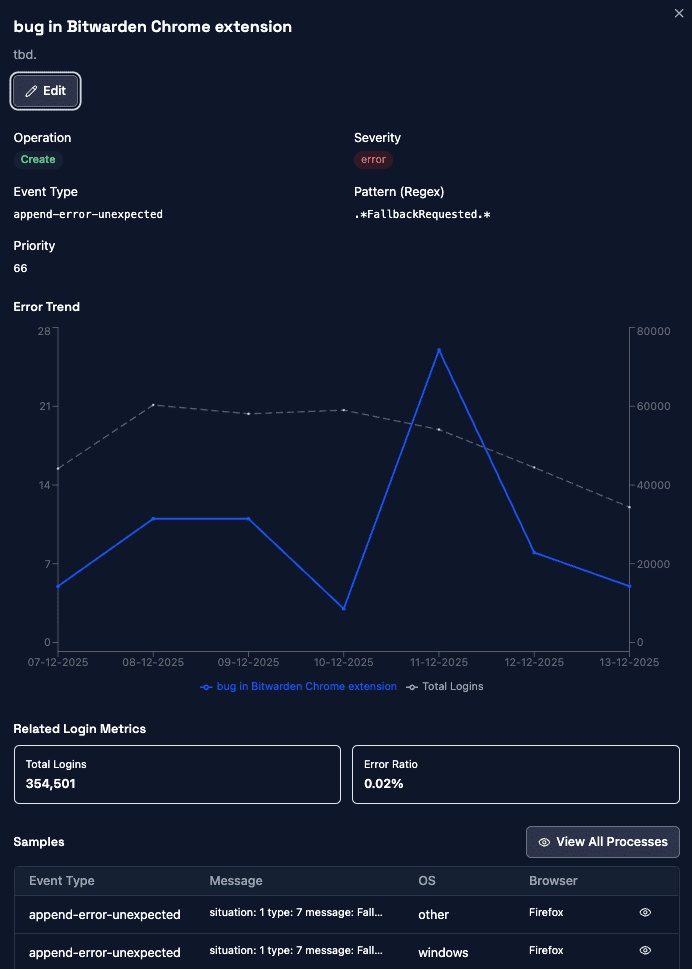
The error trend chart shows the Bitwarden extension bug spiking in November before declining again, correlated against total login volume (dashed line) to distinguish real regressions from traffic fluctuations. The samples table at the bottom surfaces the exact event type, error message, OS and browser for each occurrence, giving engineers everything they need to reproduce and fix the issue.
5.3 Drilling into a single Process#
From any error sample you can open the full process detail view, the individual authentication process with its complete context, subprocesses and event timeline.
This example shows a user on Windows 10 with Chrome 145. The
client capabilities section at the top confirms the
browser supports ConditionalCreate, a WebAuthn feature that silently creates a passkey
during a password login, upgrading the user without prompts. The process contains four
subprocesses: two login attempts and two append (passkey creation) attempts. The second
append failed with two errors, both flagged as append-error-unexpected. Drilling into
the events reveals one is a clientPasskeyOperationErrorSilent (the silent
conditional create failed with a non-cancel error)
and the other is a cboApiNotAvailablePostAuthenticator (API error after passkey
creation). Both errors are already automatically pattern-matched to "bug in Bitwarden
Chrome extension", because Corbado recognized the signature from prior occurrences.
Despite the errors in the second append, the fourth subprocess eventually completed
successfully with Bitwarden as the credential provider.
What makes this view powerful is the context available per error. You see the failure not as an isolated log line but as a snapshot of the complete authentication state at the moment it happened:
| Context | What it tells you |
|---|---|
| Existing passkeys | Which credentials the user already has, on which providers |
| Password managers | Installed credential providers (Bitwarden, 1Password, Google Password Manager) and their state |
| Platform & OS version | Windows / macOS / iOS / Android, exact version (from client hints rather than the user agent) |
| Browser & version | Chrome, Safari, Firefox, including discrepancies between user agent and client hints |
| WebAuthn capabilities | ConditionalCreate, ConditionalUI, Hybrid, PPKA, UVPA: what the device actually supports |
| Subprocess flow | Full sequence of login and append attempts within the process, each with its own outcome |
| Event timeline | Every event with timestamps, error types, messages and automatic pattern matches |
This explains far more than log files ever could. You can immediately correlate a failure with "this user has Bitwarden installed, no platform passkey and the conditional create was attempted after a successful password login." That is the bridge between outcomes ("abort rate is up") and events ("conditional create fails on Windows Chrome 145 with a Bitwarden extension bug"). Without this level of drill-down, a spike in your abort dashboard stays an abstract number; with it, you go from "something is broken" to a reproducible bug report in minutes.
The natural next step is to zoom out from a single process into the full user history. The user search view adds another layer of context:
See User Debugging in Corbado Observe →| Context | What it tells you |
|---|---|
| Client environments | Every distinct environment the user logged in from: different browsers, devices, incognito sessions. One user can have multiple client environments over time |
| Client environment lifetime | Timeline showing when each environment was first and last seen, how the user's account behaves over weeks or months |
| Classification per environment | Each client environment gets its own passkey health classification, so one environment can be append-completed while another is missing-pk-support |
| Swim lanes per device | Side-by-side timeline of processes across environments, revealing parallel device use and whether a user switched devices after a failure |
| Passkey and password manager state | Which credentials exist on the account, which providers are active and when they were registered |
This level of context is where patterns like "authentication avoided by device change" from section 4 become visible, though the user search workflow deserves a separate article.

Get free passkey whitepaper for enterprises.
The video below shows those client-side errors collected in one place, ranked by the login completion they cost rather than by how often they fire.
6. Conclusion#
Native passkey deployments are harder than web. Your code is immutable once shipped, Android's fragmentation creates a 3-5x reliability gap compared to iOS and the error surfaces differ across platforms, OS versions and credential providers. Without visibility into what is actually breaking, teams discover problems reactively - weeks after users have already churned.
The debug walkthrough in section 5 shows what changes with the right tooling: a device health spike leads to an error classification, the classification leads to a trend chart, the trend chart leads to a single process with full context - existing passkeys, password managers, capabilities, the complete subprocess flow. You go from "abort rate is up" to a reproducible bug report in minutes, not weeks.
The operational discipline that follows is straightforward: block device cohorts where passkeys reliably fail, track error pattern trends to catch regressions before they impact conversion and set different thresholds for iOS and Android based on each platform's baseline. Treat passkey reliability as a continuous operational capability, not a one-time feature launch.
For the complete web browser error reference (DOMException names, error messages by browser engine), see WebAuthn Errors in Production. For platform-specific internal error code references, see GPS Passkey Error Codes (Android) and Apple Passkey Error Codes (iOS). For testing these patterns on real devices, see Testing Passkey Flows in Native iOS & Android Apps. For setting up your analytics framework, see Passkey Analytics.

Igor Gjorgjioski
Senior Product Lead, VicRoads
We hit 80% mobile passkey activation across 5M+ users without replacing our IDP.
See how VicRoads scaled passkeys to 5M+ users, alongside their existing IDP.
Read the case study
About Corbado
Corbado is the Passkey Intelligence Platform for large-scale CIAM teams running consumer authentication. We help you see what IDP logs and generic analytics tools can't: where passkeys, passwords, OTP, social login and fallback journeys succeed, stall or fail, which devices and browsers create friction, and when an OS update silently breaks login. Two products: Corbado Observe layers process mining and observability across authentication journeys. Corbado Connect adds managed passkeys with analytics built in alongside your IDP. VicRoads runs passkeys for 5M+ users with Corbado (+80% passkey activation). Talk to a Passkey Expert →
Frequently Asked Questions#
Why is my Android passkey abort rate so much higher than my iOS abort rate?#
Android's open ecosystem creates massive behavioral variance: manufacturers customize biometric stacks, Google Play Services versions differ across devices and budget hardware has unreliable sensors. Google Pixel devices typically see 3-15% abort rates, premium Samsung S-series 8-12%, budget Samsung A-series 20-40% and low-tier brands like ZTE or vivo budget models 75-90%. iOS maintains consistency because Apple controls both hardware and software, keeping most devices between 2-5%.
How do I get more specific error information from Android passkey failures in a native app?#
In native Android apps, Google Play Services exposes 50+ internal error codes via
[50xxx]-prefixed strings in the exception message before compressing them into 12
generic WebAuthn types. You can inspect the raw Credential Manager exception message for
this prefix pattern: for example, error 50162 identifies a Folsom sync key decryption
failure that Chrome would report only as a generic NOT_ALLOWED_ERROR. Parsing these raw
strings gives you root-cause specificity that is completely unavailable to web browsers.
What is preferImmediatelyAvailableCredentials and why does it matter for passkey error handling?#
preferImmediatelyAvailableCredentials is an option on both iOS
(ASAuthorizationController) and Android (Credential Manager) that returns a distinct error
immediately when no passkey exists on the device, rather than showing an empty system
sheet. This lets your app fall back cleanly to another authentication method and
accurately classify 'no credential available' separately from 'user cancelled' in your
analytics. Web browsers deliberately suppress this signal, making it a key diagnostic
advantage of native passkey implementation.
How do I detect if users are silently avoiding passkeys in my native app without reporting errors?#
Two behavioral patterns reveal silent passkey avoidance. Authentication loops, where the app repeatedly invokes the authenticator and fails each time, can be detected server-side by flagging 3 or more failed attempts from the same session within a short time window. Device-change patterns after failed attempts, where a user switches from their native app to a browser or a different device, indicate the user is actively working around a broken passkey flow rather than reporting a problem.
What abort rate thresholds should I set for passkey alerts in a native Android app?#
Android abort rate thresholds must be set by manufacturer tier, not as a single number. Google Pixel devices are healthy at 3-15%, premium Samsung S-series at 8-12%, budget Samsung A-series at 20-40% and low-tier budget brands may exceed 75% even without a code bug. Applying iOS thresholds, where 5% signals a likely problem, to Android will generate constant false-positive alerts and cause you to miss real regressions on specific device cohorts.
Share this article


Related Articles


Table of Contents